Therefore I bought the device together with Mini USB Adapter.
Only after I had received both gadgets by mail, I started to study how I can program Arduino Mini (http://arduino.cc/en/Guide/ArduinoMini).
I have thought that I could easily connect the Mini USB adapter directly to Arduino Mini. I soon realized that connecting these devices together was not so easy after all.
If I would liked to use the Arduino Mini adapter, I should use protoboard and wire correct signal to correct ports with jump wires. OK, that is not so difficult, but I am a lazy lady and do not want to do simple things over and over again.
I noticed that I could actually connect Arduino Mini to regular Arduino by just removing the ATmega chip from some old arduino board (as Arduino Mini Guide instructs).
I already had made this kind of "stripped" Arduino in oder to program my Arduino XBee shields. In this kind of set-up I would still need to use the protoboard and make the wiring. Ripping the Arduino Mini out from the protoboard every time I would like to test it in real application was not a very fascinating idea.
Then I got a great idea. Why not make my own Arduino Mini programmer!!!
I already had one unused protoshield. I just soldered 12 -pin sockets on top of it. After that I connected all necessary signals to correct places in the protoshield so that I could stack the modified protoboard on top of the "stripped" Arduino board.

Thats it. Good ideas are very simple. No need to fuss with protoboards and wires at all.
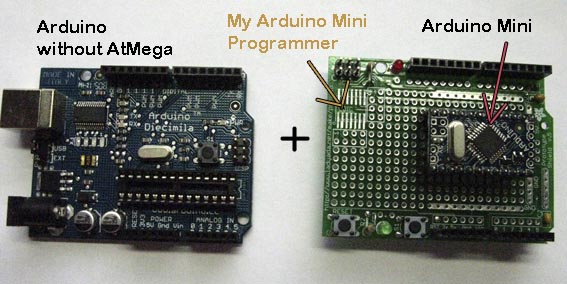
I have three Arduino boards stacked to top of each other: "stripped Arduino" + my Arduino Mini programmer + Arduino Mini.
Now I just need to remember which way I have to connect the Arduino Mini to my programmer. Nice feature is also that I have the reset button easily available on top of the "Arduino Mini programmer".
I also connected all inputs and outputs of the protoshield to Arduino Mini sockets expanding the "Arduino Mini programmer" to be "Arduino Mini programmer + SW testing board" :-)
